Litter-Robot 4 dimensions: will it actually fit your home?
Product photos make the Litter-Robot 4 look about the size of a regular litter box. It isn't. It's closer to a small washing machine, and there's a placement rule buried in the manual that catches a lot of first-time buyers off guard. Here's every official measurement, and what they mean for a studio, an apartment, or a spot tucked under a bathroom counter.
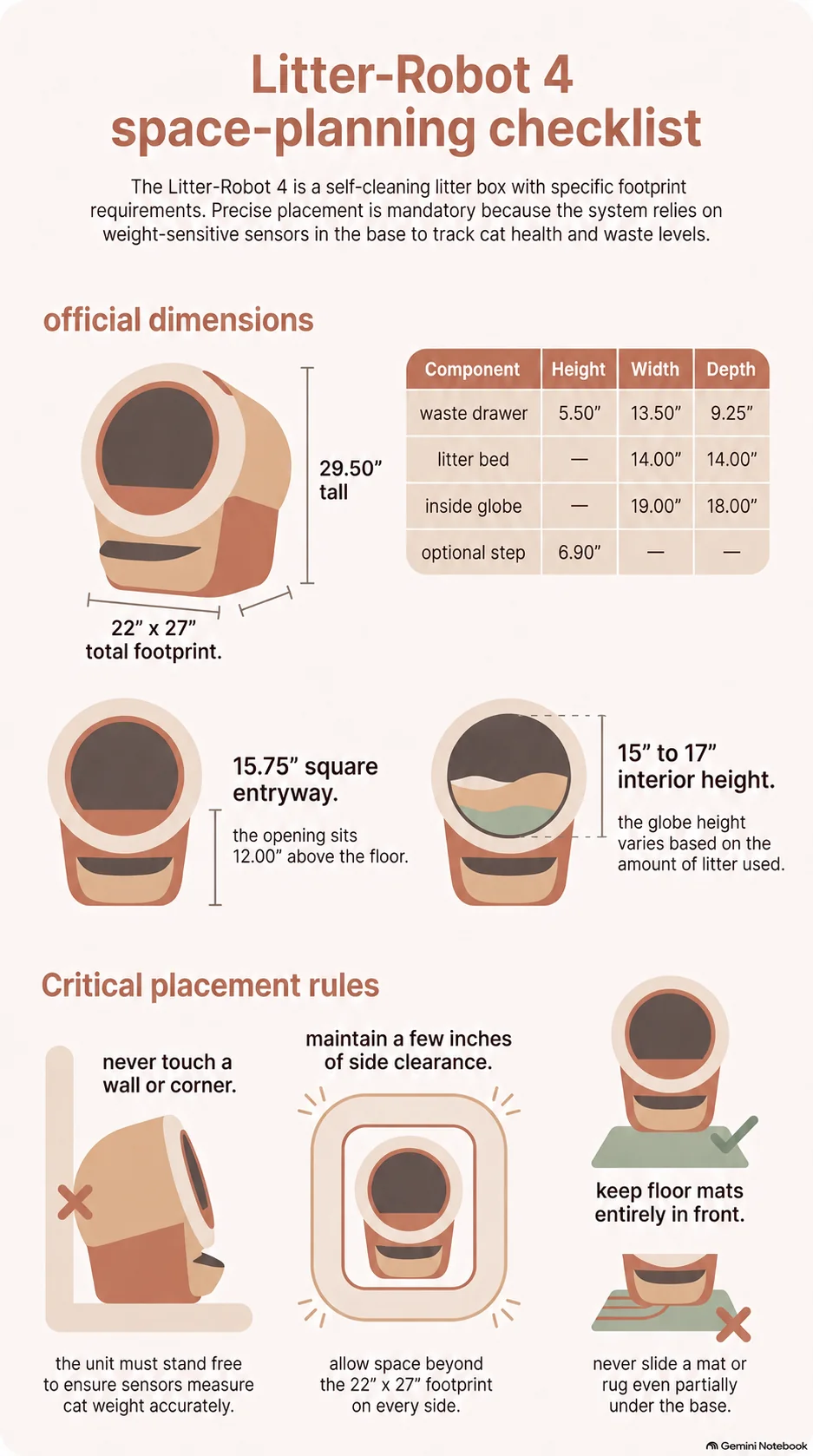
The official measurements
These numbers come straight from Whisker's own Litter-Robot 4 manual, not a tape measure guess:
| Part | Height | Width | Depth |
|---|---|---|---|
| Fully assembled unit | 29.50" | 22.00" | 27.00" (24 lbs) |
| Waste drawer | 5.50" | 13.50" | 9.25" |
| Entryway (cat opening) | 15.75" | 15.75" | — |
| Inside the globe | 15"–17" (litter-level dependent) | 19.00" | 18.00" |
| Litter bed | — | 14.00" | 14.00" |
| Floor to entryway | 12.00" | — | — |
| With optional step | 6.90" floor to step, 4.50" step to entryway | — | — |
Recommended litter fill is 8–10 lbs (3.6–4.5 kg) or about a gallon, up to the marked fill line inside the globe — worth knowing before you budget for how much litter the unit actually holds day to day.
The placement rule nobody reads first
Buried in the setup instructions, and repeated three separate times in the manual, is a line that changes where you can actually put this thing: the unit "isn't pushed against a wall or into a corner" and "must not be touching any walls." Whisker gives the reason in the same breath — "for accurate weight measurements."
That's the part worth understanding, because it tells you how strict the rule is. The Litter-Robot 4 weighs your cat, and weighs the waste drawer, through load sensors in the base. Anything the unit leans against carries part of that load, and the sensors never see it. Push it into a corner and you don't break the machine; you quietly corrupt the cat weight readings and the drawer-full indicator that the app experience is built on. Same reason the manual asks for a hard, level floor and pushes the Carpet Tray accessory if you're on carpet.
In practice, that rules out the two spots most apartments default to: wedged into a corner, or pushed flush against a bathroom wall next to the toilet. You need clearance on every side, not just in front. The manual also asks for a firm, level, indoor surface, out of direct sunlight, and near a power outlet — and specifically warns against placing mats partially under the unit, since litter mats have to sit clear of the base.
If you're set on a tight nook — a closet, under stairs, a laundry alcove — measure the full 22" x 27" footprint plus a few inches of clearance on all sides, not just the doorway opening.
How it compares to the rest of the lineup
If space is the deciding factor, the Litter-Robot 4 isn't the smallest option Whisker sells, and it isn't the largest either. Here's how the current lineup stacks up, footprint to footprint:
| Model | Footprint | Height | Entryway opening |
|---|---|---|---|
| Litter-Robot EVO | 20.6" x 24.3" | 27.6" | 14.85" x 14.85" |
| Litter-Robot 3 | 24.25" x 27.00" | 29.50" | 15.50" x 10.25" |
| Litter-Robot 4 | 22.00" x 27.00" | 29.50" | 15.75" x 15.75" |
| Litter-Robot 5 / 5 Pro | 22.00" x 27.00" | 29.90" | 15.75" x 15.75" |
One caveat on that last row, since this is an article about whether something fits: Whisker's website and the Litter-Robot 5 manual don't quite agree. The site lists the 5 at 29.9" tall on a 22" x 27" footprint; the manual's own dimensions table says 29.50" x 22.00" x 27.25". The difference is under half an inch either way, but if you're measuring a nook down to the inch, plan around the larger of the two figures.
The EVO is the only one that's meaningfully smaller in every direction — worth a look if the Litter-Robot 4 doesn't clear your space. The Litter-Robot 3 is the surprise: it's the *widest* of the four at 24.25", so it takes up more floor than the 4 does while offering a much narrower 10.25" opening. If someone offers you a used 3 to save space, that trade doesn't exist.
A checklist before you order
Straight from Whisker's own setup instructions, condensed:
- Firm, level, indoor floor — not carpet unless you add the official carpet tray, not an uneven or soft surface. Soft or unstable flooring interferes with the unit's ability to detect your cat.
- Clear of every wall, not just the front-facing side — the weight sensors need the unit standing free.
- Out of direct sunlight, in a cool, dry room.
- Within reach of a power outlet without stretching a cord across a walkway.
- If you use a litter mat, make sure it sits fully in front of the unit — not tucked partway under the base.
- If you're on carpet, budget for the official Litter-Robot 4 Carpet Tray accessory; it's not included.
Frequently asked questions
Can the Litter-Robot 4 go in a corner?
No. Whisker's own setup instructions specifically say the unit can't be pushed into a corner or touching any wall, and give the reason: the base weighs your cat and the waste drawer through load sensors, and anything the unit rests against throws those readings off. It needs clearance on every side, which rules out most corner placements even if the footprint technically fits.
Is the Litter-Robot 4 too big for a studio apartment?
Not necessarily — a 22" x 27" footprint fits in most bathrooms, closets, or laundry nooks, as long as you can give it clearance on all sides rather than pushing it into a corner. If floor space is genuinely tight, the Litter-Robot EVO has a smaller footprint (20.6" x 24.3") built for exactly this situation.
What's the smallest Litter-Robot model?
The Litter-Robot EVO, at 20.6" wide by 24.3" deep and 27.6" tall. It's also the model with the smallest cat capacity: Whisker rates it for up to two cats weighing between 3 and 19 lbs, against up to four cats at 3–25 lbs on the Litter-Robot 4.
Do I need extra clearance above the Litter-Robot 4?
The manual doesn't publish a specific overhead clearance figure, and we're not going to guess one. What it does specify is that the unit needs open space on every side at floor level — plan the surrounding furniture around that first.
Keep reading
- More articles like this one — buying, running costs and living with these machines.
- The troubleshooting library — if something is actually broken right now, start there instead.

Written by Alberto Guardia
I’m a physician working in medical informatics, and I run Pet Infrastructure on my own — no team, no manufacturer sponsorship, no paid placements. I share my home with Wolfgang, a 13-year-old Chartreux with firm opinions about litter and none whatsoever about firmware.
How this article was put together. Every figure, spec and claim here is traced back to the manufacturer’s own documentation, to official support articles, or to several owner reports that agree with each other — and the article tells you which. Where something genuinely isn’t documented anywhere, I say so instead of filling the gap.
How I check everything I publish → · Last updated August 2026