The Litter-Robot 4 cleaning calendar, at a glance
Every individual Litter-Robot 4 cleaning task is documented somewhere. Whisker's guides cover the globe wipe-down, the filter, the sensors, and its blog groups some of them into weekly and monthly buckets. The problem is that the intervals that matter most are scattered across the manual, the use-and-care article and the FAQ — and they don't always agree with each other. Whisker says a carbon filter lasts about a month in one place and two to four weeks in another; it puts the waste drawer at seven days in the manual and eight in the FAQ. Here's the whole thing on one page, with the conflicting numbers reconciled and a link to the full walkthrough for anything that needs more than a glance.
This calendar is for the Litter-Robot 4, which Whisker still sells alongside the newer Litter-Robot 5. Some intervals differ between the two, so check which unit you have before following any figure below.
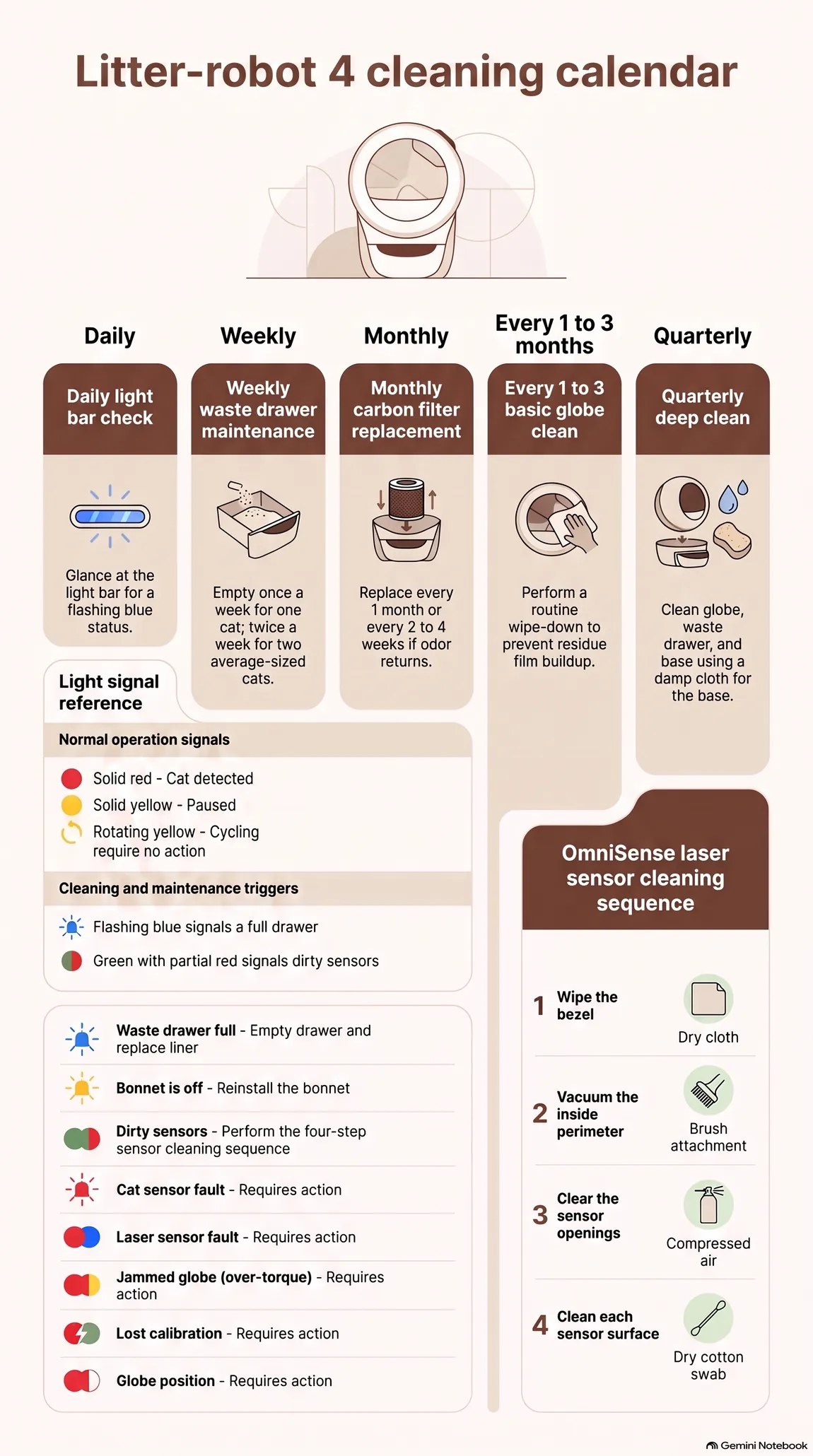
The calendar
| When | What |
|---|---|
| Daily | Nothing to clean — glance at the light bar for a flashing blue (drawer full) |
| Weekly, or twice weekly | Empty the waste drawer and replace the liner — once a week for one cat, twice for two average-sized cats |
| Monthly, or every 2-4 weeks | Swap the carbon filter, or the OdorTrap pack if you run those instead |
| Every 1-3 months | Basic globe cleaning — more often with more than one cat |
| At least every 3 months | Full deep clean — globe, waste drawer, base |
| When the unit asks | Clean the laser sensors in the bezel — a green light bar with red flashing, plus an app alert |
Daily: a few seconds
There's no daily scrubbing required — that's the point of owning one of these. The one habit worth keeping is a glance at the light bar on your way past, and the only pattern you're actually looking for is a flashing blue: waste drawer full. (Whisker's app pushes a notification for that too, so this is belt and braces rather than a requirement.)
Worth knowing what the other colors aren't, because it saves a lot of unnecessary worry: solid red means a cat has been detected and the wait-time countdown has started, solid yellow means the unit is paused, a rotating yellow pattern is simply a clean cycle in progress, and flashing yellow means the bonnet is off. None of those is a fault. The patterns that do signal a problem are a flashing red on its own (cat sensor fault) and, mostly, combinations — red with partial yellow (over-torque, usually a jammed globe), red with partial white (globe position), red and blue alternating (laser sensor fault), green with partial red (dirty sensors), red and green alternating (lost calibration). Those are worth acting on. A solid red, or a yellow cycle, is not.
Weekly: the waste drawer
The waste drawer is the genuine weekly job, and Whisker is specific about the rhythm: once a week is usually enough for a single cat, twice a week is typical for two average-sized cats. Its FAQ stretches the single-cat figure slightly further, to about every eight days. Either way, the trigger is the flashing blue indicator rather than the calendar, and the liner gets replaced every time you empty.
The sensors are the task most calendars get wrong. Whisker doesn't set a cadence for cleaning the three laser curtain sensors in the bezel — part of what Whisker calls its OmniSense detection system, alongside the weight sensors in the base — because the machine tells you itself: a green light bar with partial red flashing, plus an app notification, means they need attention. When it asks, Whisker's sequence is more than a cotton swab:
1. Wipe the bezel with a dry cloth.
2. Vacuum the inside perimeter with a brush attachment.
3. Clear the sensor openings with compressed air.
4. Finish each sensor surface with a dry cotton swab.
Everything dry — Whisker specifies no liquid cleaner for the lenses. More detail in our guide to Litter-Robot 4 faults and odors.
Monthly: the carbon filter
The carbon filter is the one task where Whisker gives two different answers, so here are both: the Litter-Robot 4 use-and-care guide says a filter "should last approximately 1 month" under normal use, while the general FAQ says every two to four weeks. Monthly is a reasonable default, two to four weeks if odor returns early. Whisker adds that scented litter shortens the interval, since the filter absorbs the fragrance along with the odor, and that replacement frequency is ultimately down to your cats' usage patterns. OdorTrap packs run on the same two-to-four-week clock. Whether you can use both at once, Whisker answers two ways: its OdorTrap installation guide says they can't be combined, its FAQ says you can. On the Litter-Robot 4 the holder clips into the filter cover, in the filter's place, so treat it as one or the other. The full replacement steps, including where the filter sits and how to pull the old one out, are in our carbon filter replacement guide.
Every one to three months: the basic globe clean
This is the interval most cleaning guides skip, and Whisker states it plainly alongside the deep clean: a basic globe cleaning every one to three months, and owners with more than one cat may want to do it more often. It's the routine wipe-down that keeps residue from building into the kind of film a deep clean has to scrub off.
Quarterly: the deep clean
Whisker's own use-and-care guide recommends a full deep clean of the globe, waste drawer, and base at least every three months. Wash with Whisker's own cleaner spray or wipes, or plain water and mild soap — never bleach or bleach-based products inside the globe, which Whisker warns can produce irritating fumes. Never submerge or spray the base or Control Panel directly, since both house electronics and sensors: Whisker's method there is to dampen a cloth with disinfectant, or spray away from the base onto a cloth, and wipe. Let the globe dry completely before reassembling it and closing the bonnet.
If the smell comes back well before the next scheduled deep clean, something else is going on — our guide to why a Litter-Robot still smells after cleaning covers the two most common causes that a normal clean doesn't fix.
Frequently asked questions
How often should I empty the Litter-Robot 4 waste drawer?
Whenever the flashing blue drawer-full indicator triggers. Whisker's manual puts that at about once a week for a single cat and twice a week for two average-sized cats; its FAQ stretches the single-cat figure to roughly every eight days. Bigger cats and busier households will see it sooner. Replace the liner every time you empty.
Is it safe to clean my Litter-Robot 4 with vinegar?
Yes, and Whisker suggests it itself. Its support guides specify the Litter-Robot cleaner or water with a mild soap for routine cleaning, and its blog goes further for stubborn buildup: for sticky residue from urine or clumped litter, "use a pet-safe enzymatic cleaner or a vinegar-water mix (1:1 ratio) to break it down." What Whisker is explicit about avoiding: bleach or bleach-based cleaners inside the globe, and never submerging or spraying the base or Control Panel directly.
Why does my Litter-Robot still smell even though I clean it on schedule?
A calendar-based clean handles normal buildup, but two specific causes can outlast it: worn seal strips on the Litter-Robot 4, or an overdue carbon filter. Our full odor diagnosis guide walks through both.
How many cats does the cleaning schedule above assume?
The weekly and monthly figures above are calibrated for one to two average-sized cats, which is also where Whisker's own drawer-frequency guidance stops (once a week for one cat, twice for two). Whisker rates the Litter-Robot 4 for up to four cats overall, so a busier multi-cat household should treat every interval on this page as a ceiling, not a target, and empty the drawer, swap the filter, and clean the globe sooner than the calendar suggests.
What litter should I use to keep cleaning simple?
A clumping litter — clay is what Whisker recommends first, but several clumping alternatives are on its approved list too. What doesn't work is anything non-clumping, or pelleted — that's most paper, pine and wood litter — and on the Litter-Robot 4 specifically, translucent or white crystal litter throws off the litter-level reading. The wrong type is a common cause of extra cleaning, not less. See our litter compatibility guide for the full list of what works and what to avoid.
Keep reading
- More articles like this one — buying, running costs and living with these machines.
- The troubleshooting library — if something is actually broken right now, start there instead.

Written by Alberto Guardia
I’m a physician working in medical informatics, and I run Pet Infrastructure on my own — no team, no manufacturer sponsorship, no paid placements. I share my home with Wolfgang, a 13-year-old Chartreux with firm opinions about litter and none whatsoever about firmware.
How this article was put together. Every figure, spec and claim here is traced back to the manufacturer’s own documentation, to official support articles, or to several owner reports that agree with each other — and the article tells you which. Where something genuinely isn’t documented anywhere, I say so instead of filling the gap.
How I check everything I publish → · Last updated August 2026